
10 Best "We Heart It" Alternative 2026
Websites like We Heart It are a great way to share your favorite images and style inspiration with the world. But what i...
Imagine you need to compare three competitors before a meeting. You open a dozen tabs, copy prices into a spreadsheet, skim their blog posts, and draft two emails to your team. None of it is hard. It just eats two hours.
That kind of errand, many small steps across several apps for one goal, is what AI agents are built to take off your plate. Not all of it, and not without you watching. But enough to change your day.
An AI agent takes a goal in plain words, makes a plan, and acts across your apps and websites to finish it. That's what separates it from the two things people mix it up with. A chatbot answers your question and stops. A traditional automation, like a Zap, follows fixed rules you set up in advance and repeats them exactly. An agent decides the steps itself, adjusts when something fails, and keeps going until the job is done.
Worth saying clearly, though. Agents in 2026 are not fully independent. The good ones stop and ask before they send an email, buy something, or submit a form. So the real question isn't whether an agent can run on its own. It's which steps you let it run, and where you stay in control.
What follows are nine tools worth knowing, grouped by what they're actually for. The examples are realistic walkthroughs of what each one can do, not sessions I personally ran.
ChatGPT's agent mode is the one most people will meet first, because it lives inside the chatbot they already use. Flip on "agent mode" from the tools menu and ChatGPT stops just talking and starts doing. It opens its own browser, clicks through sites, logs in where you allow it, runs code, and hands back a spreadsheet or a slide deck. OpenAI built it by combining the web-clicking of its old Operator tool with the multi-source digging of Deep Research, so a request like "analyze these three competitors and build me a comparison table" becomes one job it carries out end to end. You'd check the figures afterward, since pricing pages change and it can misread a tier, but the finished table arrives editable. The free plan gets you ChatGPT without the agent. Plus at $20 a month unlocks agent mode but caps it at roughly 40 agent runs monthly, which is enough to try it but not to lean on daily. Pro is $200 a month. The main limitation is that it works inside a sandbox, so it reaches your own files and desktop apps far less than a tool that runs natively on your machine.

Claude goes the other direction and gets closer to your actual computer. It has three agent modes that are easy to blur together. Cowork works on the files in a folder you point it at. Computer Use sees your screen and drives the mouse and keyboard. Claude Code is for programming. What's smart is the order it tries things in. It reaches for your connected apps like Gmail and Drive first, falls back to a browser next, and only takes over your screen when nothing else will do the job. You can even kick off a task from your phone and have it run on your desktop at home. Give Cowork a folder of twelve messy meeting notes and ask for one clean summary of decisions and open tasks, and it reads each file and writes the summary straight back into that folder, where you need it. Pricing mirrors ChatGPT. Free, then Pro at $20 a month (Cowork is included at that level), then Max at $100 or $200 for heavier use. The catch is the platform. The strongest desktop computer-use features have been Mac-first, so Windows users get a thinner version. It suits document and analysis work, Mac users, and developers best.

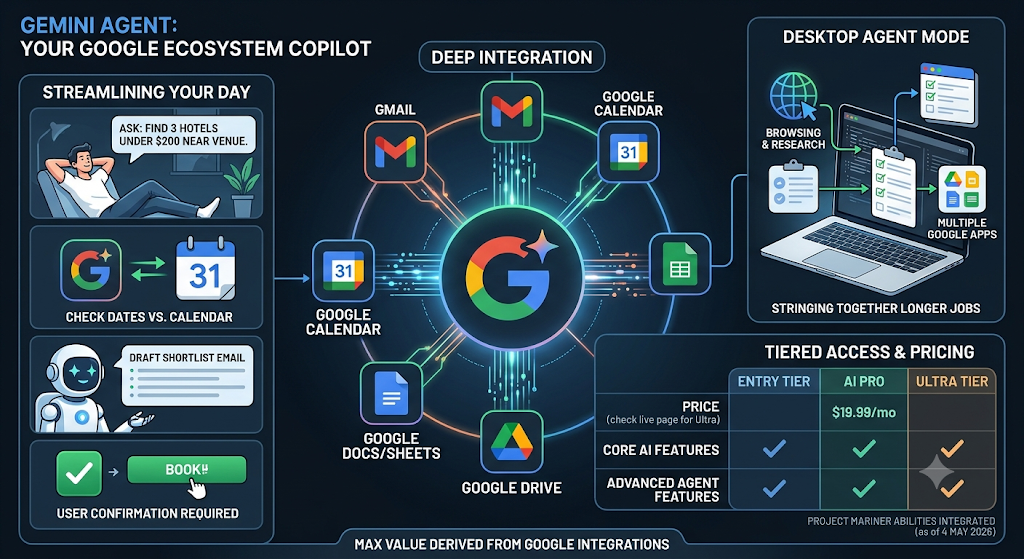
Google's Gemini Agent is the pick if your life already runs on Google. Google actually shut down its standalone web agent, Project Mariner, on 4 May 2026 and poured its abilities into Gemini instead. Now Gemini Agent files email, organizes tasks, and helps with bookings, while its desktop Agent Mode strings together browsing, research, and your Google apps to handle longer jobs. Ask it to find three hotels under a set price near a venue, check the dates against your Google Calendar, and draft a shortlist email, and it does exactly that, pausing for your okay before it would book or send anything. AI Pro runs $19.99 a month, with a cheaper entry tier and a pricier Ultra tier on either side (the Ultra price has moved around this year, so check the live page), and the agent features sit on the higher tiers. The honest limitation is that nearly all of its value comes from the Google integrations, so if you're not a Gmail-and-Calendar household, you're leaving most of it on the table.
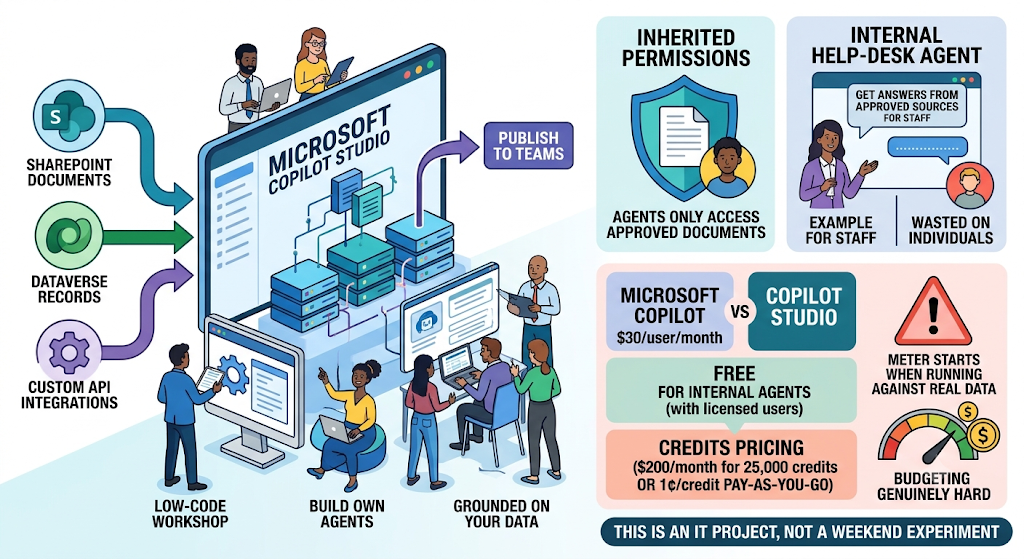
Microsoft Copilot Studio is a different animal, not a personal assistant but a low-code workshop for companies on Microsoft 365 to build their own agents. The draw is that those agents are grounded in your own data in SharePoint, Dataverse, and custom APIs, and they inherit your existing permissions, so an agent can't surface a document the person asking couldn't already open. A typical build is an internal help-desk agent trained on company docs and published to Teams, so staff get answers from approved sources instead of guessing. The pricing is where teams get caught out. Microsoft Copilot itself is about $30 per user per month, and Copilot Studio comes free for internal agents if users are already licensed, or $200 a month for 25,000 credits, or a penny per credit pay-as-you-go. That last option is the trap. The meter can start charging the moment an agent runs against real data, which makes budgeting genuinely hard. This is an IT project, not a weekend experiment, and it's wasted on individuals.
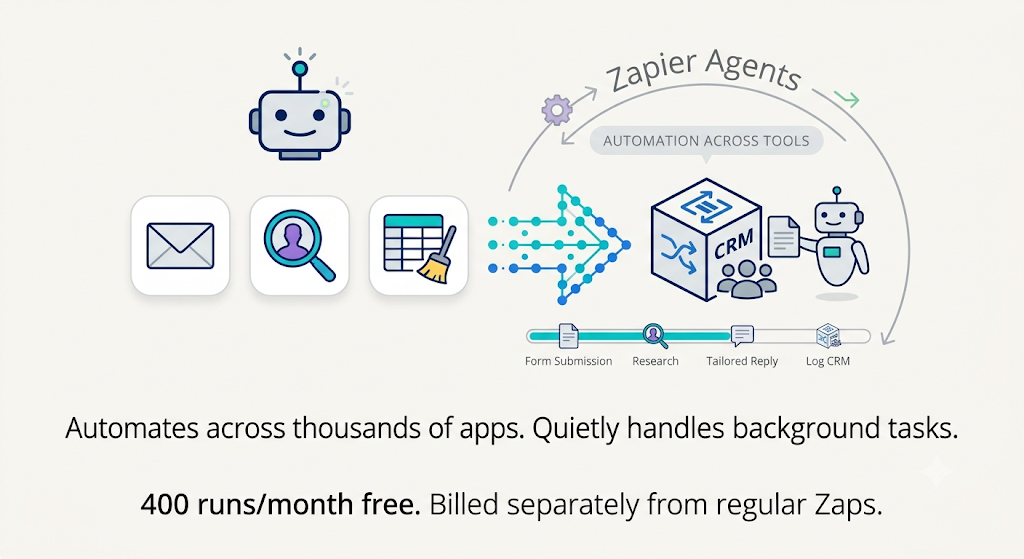
Zapier Agents takes Zapier's biggest asset, connections to thousands of apps, and puts an agent on top. These agents act across your existing tools, run quietly in the background, and handle things like drafting replies, researching prospects, and tidying data. Picture an agent that researches every new lead the moment a form comes in, writes a tailored reply, and logs the record in your CRM, all without you lifting a finger. The free plan covers up to 400 agent runs a month, and Agents Pro is $400 a year, which works out to about $33 a month. One number to underline. Zapier Agents is billed separately from your regular Zaps, and those add-ons stack up faster than people expect. It fits small businesses already standardized on Zapier.
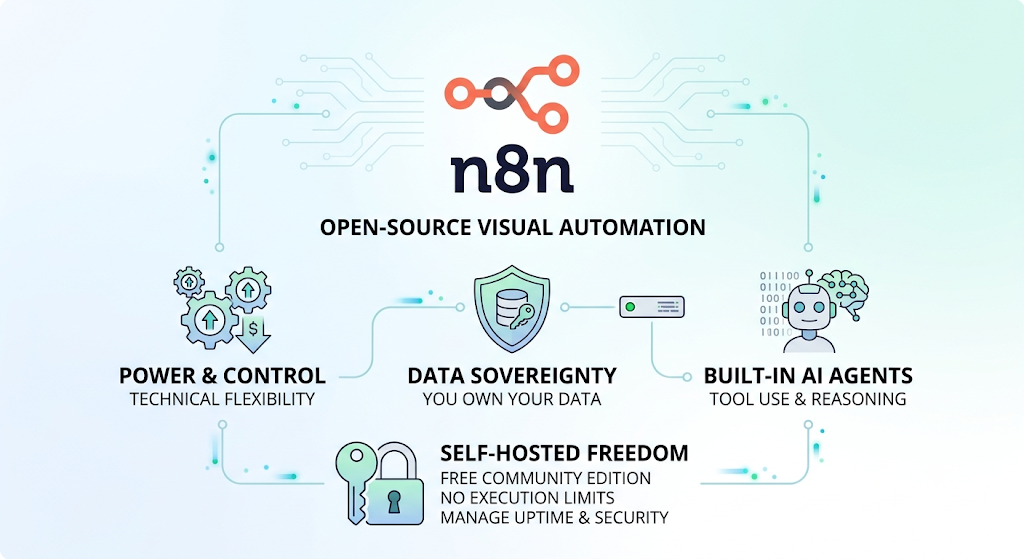
n8n is for the technical crowd who want the same power without the price creep, and who care where their data lives. It's an open-source, visual automation tool with built-in AI agent nodes that handle tool use, memory, and multi-step reasoning, and its real selling point is that you can self-host it. A support-triage agent that reads tickets, rates urgency, drafts a reply, and routes the hard cases to a human can run on a cheap server you control, with none of the ticket data leaving your walls. Self-hosted, the Community Edition is free with no execution limits. You only pay for the server underneath it, and the managed cloud version starts around $20 a month. The price of that freedom is that you own the uptime and security yourself, and it rewards real technical skill. Non-technical users will be much happier with Zapier or Lindy.
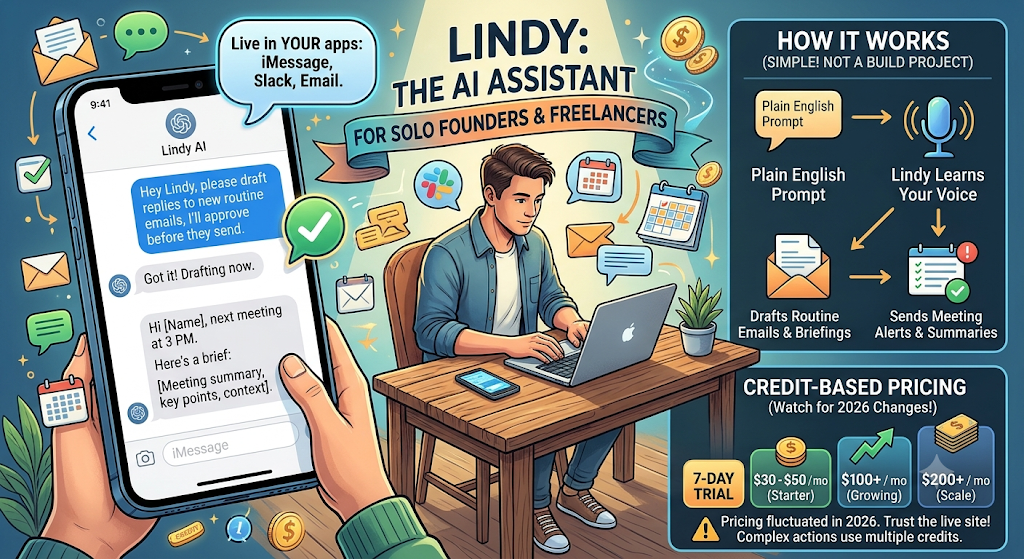
Lindy aims at the opposite person, the solo founder or freelancer who wants an assistant, not a build project. It makes agents from plain English and, more to the point, lives in your iMessage, Slack, and email, so using it feels like texting a capable assistant rather than operating software. Set one up to draft replies to routine emails in your voice and text you a short briefing before each meeting, approving the drafts before they send, and that's the whole experience. Pricing is credit-based, with a seven-day trial and paid plans that run roughly $30 to $50 a month at entry and climb to about $100 and $200. Be warned that Lindy reshuffled its pricing more than once in 2026, so trust the live page over any article, and that complex actions eat several credits each. The bill tends to climb right as the agent starts earning its keep.
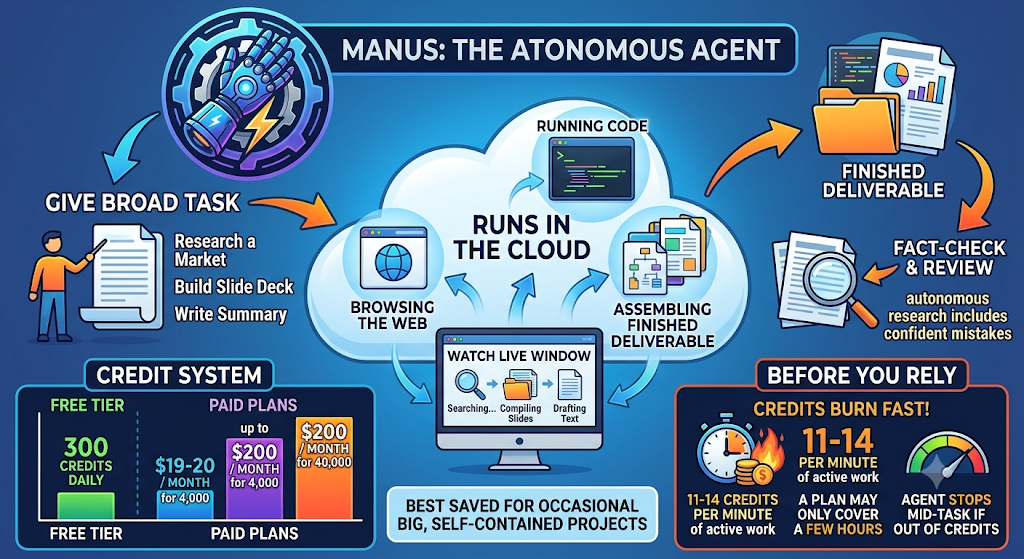
Manus is the "do the whole thing and get back to me" option. Hand it a broad task and it runs in the cloud, browsing, running code, and assembling a finished deliverable with little further input, while a live window lets you watch each step. Ask it to research a market, build a slide deck, and write a one-page summary, and you can walk away and come back to actual files, which you'll then want to fact-check, because autonomous research includes confident mistakes. There's a free tier with 300 credits that refresh daily. Paid plans start around $19 to $20 a month for 4,000 credits and run up to $200 for 40,000. The thing to understand before you rely on it is that credits burn at roughly 11 to 14 per minute of active work, so a plan's allowance may only cover a few hours, and the agent can stop cold mid-task if it runs out. It's best saved for occasional big, self-contained projects.
Cursor is the one built for developers. It's an AI code editor with an agent that makes edits across many files at once, refactors, runs terminal commands, and reviews pull requests. Tell it to add input validation to every form in an app and it finds the files, makes the edits consistently, runs the tests, and reports back what it changed. You review the diff before committing, because an agent can introduce subtle bugs at scale. Cursor Pro is $20 a month, with higher tiers at $60 and $200. For comparison, GitHub Copilot starts at $10 a month and keeps code completions free. The downsides are that heavy agent use runs up usage costs and that you have to adopt Cursor's editor to get the benefit. It's worth it for developers doing serious multi-file work.

The cost columns use different billing models, so read them together, not in isolation. A flat subscription, a credit system, and free self-hosting aren't the same thing.
| AI agent | Best for | What it does | Setup | Free option | Starting price | Main limit |
|---|---|---|---|---|---|---|
| ChatGPT agent | General users | Browse, research, build sheets or slides | Easy | Yes (no agent) | $20/mo | Tight limits on Plus |
| Claude | Docs, Mac, code | File work, computer use, coding | Easy to Medium | Yes (limited) | $20/mo | Desktop control is Mac-first |
| Gemini Agent | Google users | Browsing, bookings, email tasks | Easy | Yes (limited) | $19.99/mo | Best features on top tiers |
| Copilot Studio | M365 companies | Custom agents on company data | Hard (IT) | Trial only | ~$30/user/mo + credits | Costs hard to predict |
| Zapier Agents | Ops teams | Act across 8,000+ apps | Easy to Medium | Yes (400/mo) | ~$33/mo (billed yearly) | Priced separately from Zaps |
| n8n | Technical teams | Multi-step AI workflows | Hard | Yes (self-host) | Free, Cloud ~$20/mo | Needs tech skill |
| Lindy | Solo pros | Inbox, scheduling via chat | Easy | 7-day trial | ~$30 to $50/mo | Credits burn fast |
| Manus | Big one-off tasks | Autonomous research, decks | Easy | Yes (daily credits) | ~$19 to $20/mo | Credits deplete quickly |
| Cursor | Developers | Multi-file coding | Medium | Yes (Hobby) | $20/mo | Usage costs climb |
Prices checked across vendor and independent sources in September and October 2026 and change often. For credit and consumption plans, the starting price is a floor, not a predictable monthly total. Confirm on the official pricing page.
Price barely helps you decide, since the four main assistants all land around $20. What they do is the real difference. Start by naming the exact task you want handed off. An inbox job points you toward Lindy or Zapier, a coding job toward Cursor or Claude, a one-off research deliverable toward Manus or a ChatGPT or Gemini agent. Then ask whether you need the tool to actually act or just to suggest, because some only draft. Check that it connects to the apps you already use. Google users get the most from Gemini, Microsoft 365 shops from Copilot, and anyone with a scattered toolset benefits most from Zapier's huge library. Be honest about setup, too. Self-hosted n8n is cheap but assumes you can run a server, while the chat assistants assume nothing. For the credit and consumption tools especially, estimate how often the agent will run before you commit, since the ones that work best are the ones you'll use most and pay most for. And whatever you pick, keep the approval gate on for anything that sends, spends, publishes, or changes a record.
The abilities are real, and so are the ways they go wrong. Agents research confidently even when they're mistaken, and a misread price looks identical to a correct one, so verify before you act. Web agents click the wrong button, get stuck on logins, and break when a site changes its layout. Credit and consumption pricing is the quiet budget risk of the year. An agent can loop and burn credits with nothing to show for it, and a meter can start charging the moment one touches real data. And there's prompt injection. A hidden instruction buried in a web page or document can hijack an agent that's browsing for you. You can cut most of this down with a few habits. Give the agent only the access the task needs, review its output, test new agents on low-stakes work first, cap spending where you can, and require a confirmation before anything consequential happens.
There's no universal best AI agent in 2026, and the only question that matters is what you want to hand off. If you already pay for ChatGPT, Claude, or Gemini, start there. Try agent mode on something low-stakes and watch how it works before trusting it with more. If your work is spread across a lot of apps, try Zapier's free tier. If you're technical and care about data, set up n8n. If you want a texting assistant, try Lindy. If you have the occasional big project, let Manus run one. If you code, put Cursor or Claude Code on a real task.
Whatever you choose, delegate the small and reversible things first, keep a human gate on anything that sends or spends, and always check the output before you trust it. The agents are good enough now to save you real time, and still wrong often enough that the hours they give back aren't worth much if you skip the few minutes it takes to check their work.

Websites like We Heart It are a great way to share your favorite images and style inspiration with the world. But what i...

Catalogs are comprehensive printed materials that showcase your products and services. They contain detailed description...
Understanding the Role of a Data ScientistBefore embarking on your data science journey, it's essential to understand th...

Scam sites used to be easy to laugh at. Broken English, clip-art logos, a checkout page that looked like it was built in...