
Phyzii Pharma CRM Review 2026, Features, Pricing, Strengths and Honest Limitations.
Phyzii is a cloud-based CRM built by Cirrius Technologies specifically for pharmaceutical and life sciences sales teams....
Lenso.ai is a reverse image search tool. You upload a photo, and it shows you where that photo appears online. It can also find faces, places, and pictures that look similar.
I used the free version, went through the company's guides, and compared it with Google Lens, TinEye, and PimEyes. Here is my honest review.
| Price | Free plan; paid plans from about $19.99/month |
| Face search | Yes (selected regions only) |
| Duplicate search | Yes |
| Similar images | Yes |
| Place search | Yes |
| Alerts | Yes (3 free) |
| API | Developer plan only |
| Mobile app | No (works in mobile browser) |
| Support | Email and contact form |
Lenso.ai is a Polish company that started in 2024. Its idea is simple: one search that finds a person's face, copies of your photo, the place a picture was taken, and similar-looking images.
Google search works with words. Lenso works with the picture itself. That helps when you don't know what to type, or when you want to know who else is using your photo.
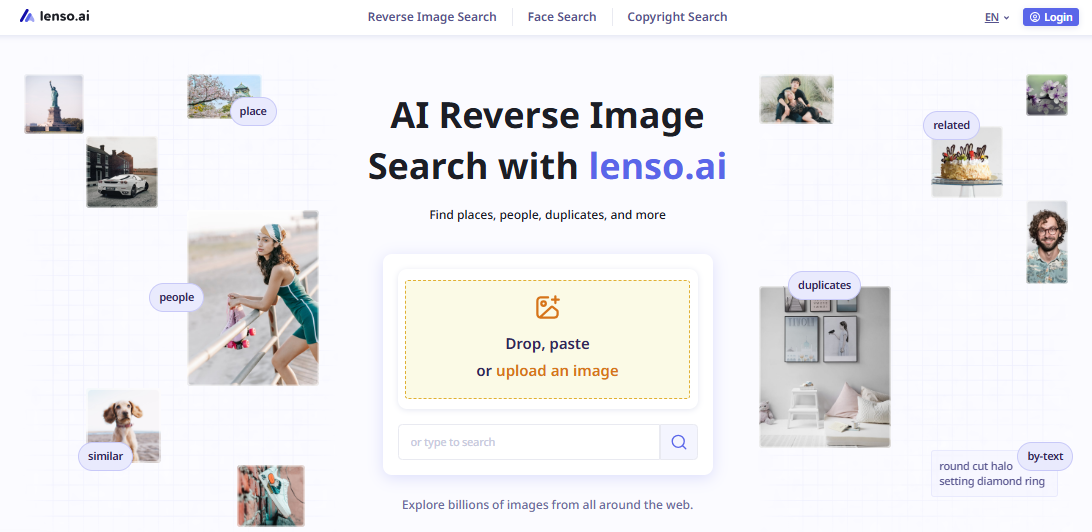
Using Lenso.ai takes less than a minute.
Lenso doesn't clearly list file size limits or supported formats on the pages I could read. JPG and PNG worked fine for me.
This is Lenso's big selling point. Upload a photo with a clear face, open the People tab, and it finds other photos of the same person. Lenso says it works even if the person has changed their hairstyle or is wearing glasses.
Two warnings. First, face search is only available in selected regions, and Lenso doesn't say which ones. If you don't see a People tab, that's why.
Second, a match is not proof. Lenso's own blog says its deeper search may find people who look very similar but aren't the same person. Always check before you act on a face match.
This is the most useful feature for photographers and bloggers. It finds copies of your image, including cropped, edited, or filtered versions.
If someone has taken your product photo and stuck their logo on it, this is where you'll find it. But Lenso can only show pages it has already crawled. Its index is smaller than Google's, so no result doesn't mean no copies exist.
Upload a landscape or a building and the Places tab shows you similar spots. It works well for famous landmarks. Small, lesser-known places are harder.
Similar finds pictures with the same look or layout. Related finds pictures connected to yours that don't necessarily look alike.
A nice trick from Lenso's guide: upload a blue mug and type "red" in the Text filter to find red mugs. Handy for shopping or design ideas.
Click the bell icon on any category and Lenso emails you when it finds a new match. The free plan gives you three alerts, but only for Duplicates.
Anything you unlock is saved to Collections automatically. You can also share any search by copying the link.
This is the main reason to buy the Professional plan. A normal search shows 30 to 100 results, with a cap of about 1,000. Research Mode takes longer but can find ten times more.
The trade-off is fair: normal search gives you fewer but more accurate results; Research Mode gives you more results, some less accurate. It only works for People and Duplicates.
Research Mode also adds five extra filters: language, domain, image size, date range, and a keyword in the page title. Note that the date filter uses the date Lenso found the page, not the date the image was posted.
Added in July 2026 for Professional users. It writes copyright takedown emails for you. You pick the photos, click "Generate DMCA Report," and Lenso puts the links into a ready-to-copy message.
It doesn't send anything. You copy the message, find the website's contact email, and send it yourself. It also uses up your unlocks, because it has to unlock every selected image to find the source.
Developers can plug Lenso into their own apps. The docs are on GitHub. You send an image, pick a category, and get back the image URL, source page, a confidence score, and the date it was indexed. Each page of 20 results counts as one API call.
Pricing |
|---|
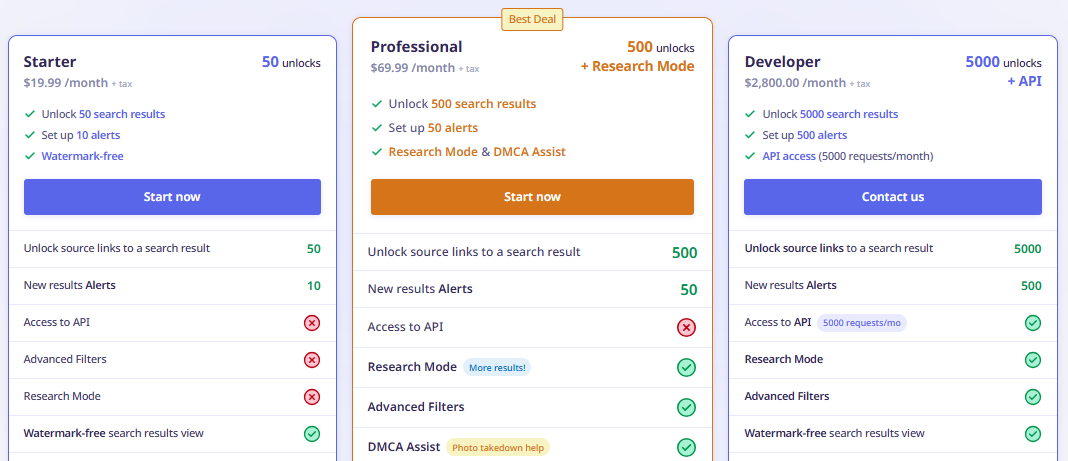
Here's the strange part. The official pricing page lists three plans, Starter, Professional, and Developer, but shows no prices. You only see the numbers once you're in checkout.
So the prices below come from the checkout screen and recent third-party listings. TheToolsVerse checked the pricing page in September 2026 and found the same thing: three tiers with no prices. Older reviews listed Starter at $15.99, so prices appear to have gone up in 2026.
A few more things to know:
Prices can change. Please check the official Lenso.ai website to confirm current pricing, subscription limits, and applicable terms.
Partly. You can search, browse previews, filter, sort, and set three alerts without paying or signing up. But the source links are behind the paywall, and those are usually what you want. It's free to look, paid to act.
Lenso says it never saves or shares uploaded images, results links expire six hours after your last click, and uploads are never used for AI training. There's also an opt-out form to remove your face from its index.
Those are the company's promises. I can't check them. My advice: don't upload anything private, and remember a face match doesn't prove who someone is.
| Lenso.ai | Google Lens | TinEye | PimEyes | |
|---|---|---|---|---|
| Best at | Faces, copies, places, lookalikes | Identifying things | Finding exact copies | Faces only |
| Face search | Yes (some regions) | No | No | Yes |
| Duplicates | Yes, incl. edited | Partly | Yes | Faces only |
| Source links | Paid | Free | Free | Paid |
| Alerts | Yes | No | Paid | Paid |
| API | Developer plan | No | Bundles from $200 per 5,000 searches | On request |
| Price | Free; ~19.99to~2,800/month | Free | Free; API bundles | $29.99 to $299.99/month |
Email and contact form only. No live chat. The blog has lots of how-to guides and is updated almost every week. The FAQ page didn't load properly for me on two visits, so I used the guides instead.
Here's my honest opinion.
Lenso.ai does one thing better than anything else I tried: it gives you five types of results from one upload. If you're a photographer, a blogger checking image sources, or someone curious where your photos have ended up, that's useful. The alerts and collections make it easy to keep using.
What I didn't like is the money side. Hiding prices until checkout is annoying. The free plan shows you a locked door, not a real taste of the product. And the Developer plan is priced for companies, not for someone building a side project.
Would I pay for it? For occasional use, I'd take the one-time payment over a subscription. Same 50 unlocks, no auto-renewal. If I were checking images every week or sending takedown notices, Professional would be worth it for Research Mode and DMCA Assist. I wouldn't pay for Starter every month unless I always needed source links.
If face search is your only reason and it's not available in your country, skip it. If you just want to identify a plant or a landmark, use Google Lens. For everyone else, Lenso.ai is a solid tool, as long as you know that every match needs checking and the links cost money.

Phyzii is a cloud-based CRM built by Cirrius Technologies specifically for pharmaceutical and life sciences sales teams....

TechGup.org does not announce its intentions loudly. There is no manifesto, no grand claim about reshaping digital media...

Are you in looking for a powerful and beautifully designed laptop? So your wait was over. Apple introduced its 12-inch M...