Step-by-Step Guide To Become A Data Scientist From Scratch
Understanding the Role of a Data ScientistBefore embarking on your data science journey, it's essential to understand th...
An AI grammar checker reads your text and flags mistakes in seconds. It catches spelling slips, wrong punctuation, awkward sentences and tone problems that a basic spell check misses. Many tools also rewrite weak sentences for you.
This guide covers seven tools that writers, students and teams use the most in 2026. For each one you get what it does, the key features, the current price and who it suits best. Every price and feature below was checked against the official product pages in October 2026.
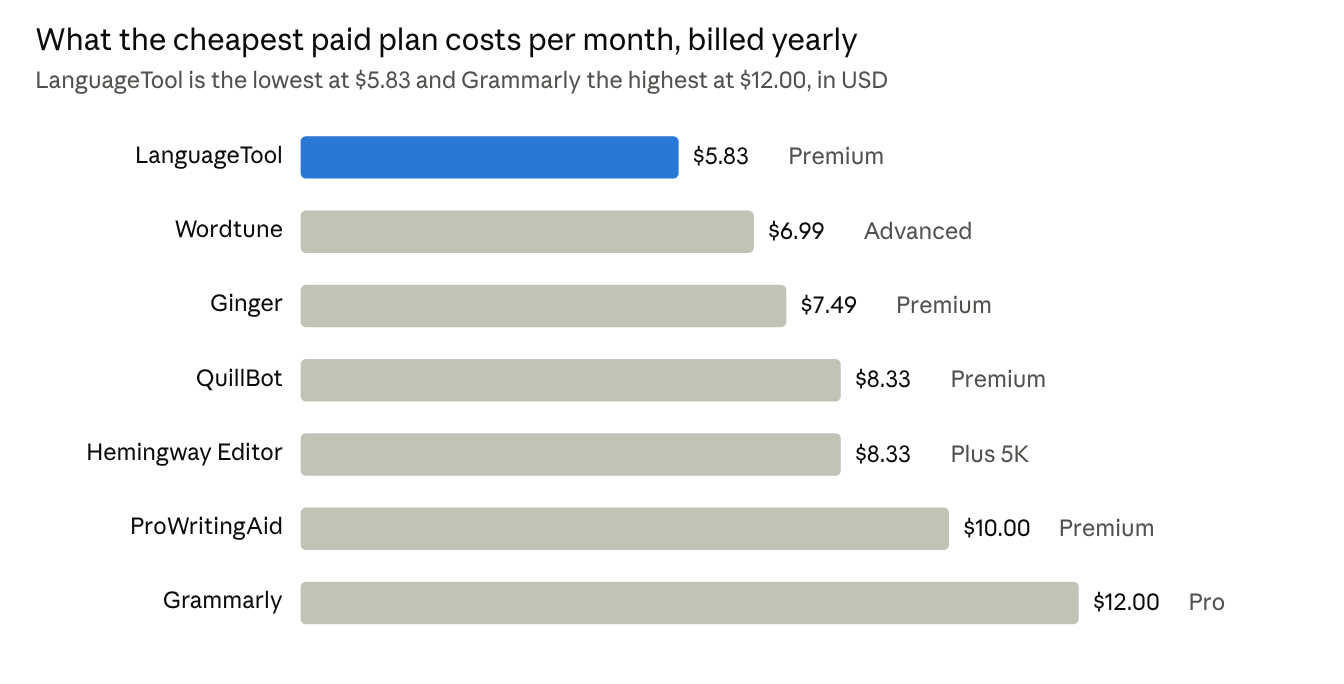
Official pricing pages opened October 15, 2026. LanguageTool and Ginger prices from 2026 third party listings.
All seven tools have a free plan. The chart shows the entry paid plan for each one, so you can see the spread at a glance. The table below shows the three things that most often decide which tool fits.
| Tool | Free plan | Grammar languages | Plagiarism checker | Works in Google Docs |
|---|---|---|---|---|
| Grammarly | Yes | English | Yes, on Pro | Yes |
| QuillBot | Yes | 6 | Yes, on Premium | Yes, via extension |
| ProWritingAid | Yes | English | Paid add on | Yes |
| LanguageTool | Yes, website only | 30 or more | No | Yes, on Premium |
| Hemingway Editor | Yes | English | No | No |
| Wordtune | Yes | English | No | Yes |
| Ginger | Yes | English | No | No |
Grammarly is the most widely used AI grammar checker, with more than 40 million users. It works almost everywhere you type, including Chrome, Word, Google Docs, Gmail, Windows, Mac, iPhone and Android.
Key features
Pricing
| Plan | Price | What you get |
|---|---|---|
| Free | $0 | Grammar and spelling fixes, tone detection, 100 AI prompts a month |
| Pro | $12 per member a month, billed yearly | Everything in Free plus sentence rewrites, tone changes, plagiarism check, 2,000 AI prompts a month |
| Enterprise | Custom quote | Everything in Pro plus admin controls, single sign on and dedicated support |
Pro comes with a 7 day free trial.
Best for: anyone who wants one tool that works in every app they already use. Students and office workers get the most value from the free plan.
QuillBot started as a paraphrasing tool and now bundles a grammar checker, plagiarism checker, AI detector, summarizer and translator in one place. More than 35 million writers use it, and the grammar checker works without creating an account.
Key features
Pricing
| Plan | Price | What you get |
|---|---|---|
| Free | $0 | Basic grammar fixes, paraphrase up to 100 words in 2 modes, summaries up to 1,200 words |
| Premium | $8.33 a month billed yearly, or $19.95 month to month | Advanced grammar, tone insights, unlimited paraphrasing, plagiarism checker, AI detector |
| Team | Volume discount for 5 or more members | Everything in Premium plus usage metrics and a user dashboard |
There is no free trial, but Premium comes with a 3 day money back guarantee.
Best for: students and anyone who needs to fix grammar and rewrite sentences in the same tool at a lower price than Grammarly.
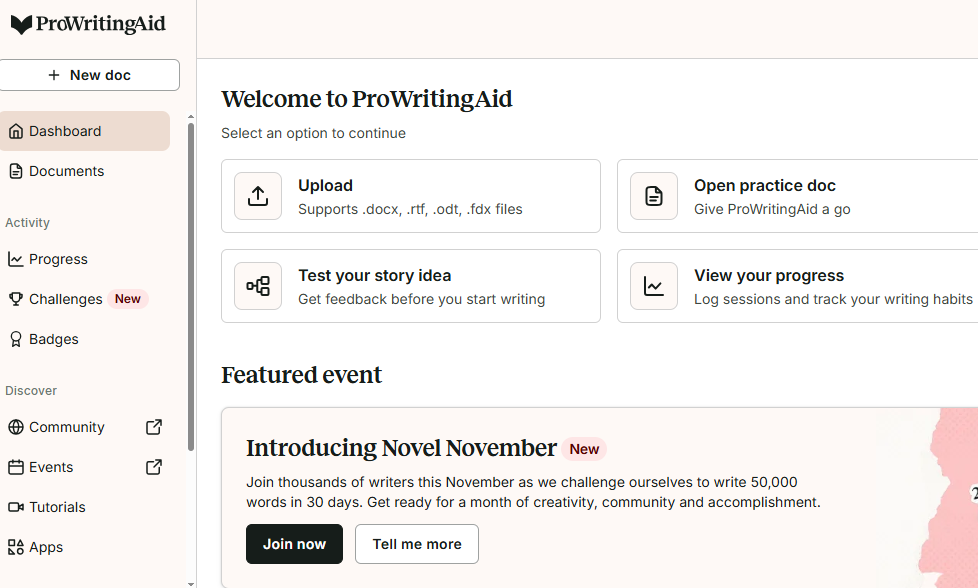
ProWritingAid goes deeper than a grammar check. It runs more than 25 reports on your writing, such as readability, overused words, sentence length, passive voice and pacing. It is built mainly for authors, bloggers and anyone writing long documents.
Key features
Pricing
| Plan | Price | What you get |
|---|---|---|
| Free | $0 | Grammar fixes on 500 words at a time, 10 rephrases a day, 2 report runs a day |
| Premium | $10 a month billed yearly ($120), $30 month to month, or $399 lifetime | Unlimited words, unlimited rephrases, all reports, custom style guide |
| Premium Pro | $12 a month billed yearly ($144), $36 month to month, or $699 lifetime | Everything in Premium plus more AI credits, live workshops and critique sessions |
Yearly and lifetime plans come with a 3 day money back guarantee. Students get 25 percent off yearly plans.
Best for: fiction writers, bloggers and long form writers who want detailed feedback on style, not just grammar. The lifetime plan is a strong deal if you plan to use it for more than 3 years.
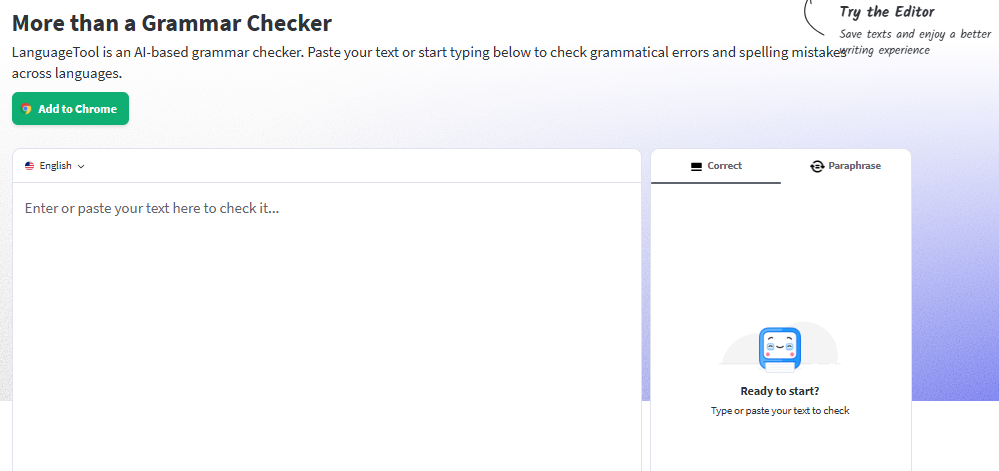
LanguageTool is the best pick if you write in more than one language. It checks grammar, spelling and style in more than 30 languages, including English, German, French, Spanish, Dutch, Portuguese and Polish. It started as an open source project and still offers a free web editor.
One big change in 2026: since March 2026 the browser extension only works with a Premium plan. Free users can still use the grammar checker and paraphraser on the LanguageTool website.
Key features
Pricing
| Plan | Price | What you get |
|---|---|---|
| Free | $0 | Basic grammar and spelling on the website, up to 10,000 characters per text, 3 paraphrases a day |
| Premium | About $70 a year per user, or about $20 to $25 month to month | Browser extension, 20,000 extra style checks, texts up to 100,000 characters, unlimited paraphrasing, translation |
| Teams | Custom quote | Everything in Premium plus shared style guide and dictionary |
Premium comes with a 14 day free trial.
Best for: people who write in German, French, Spanish or other non English languages, and anyone who wants a privacy friendly tool with an open source engine.
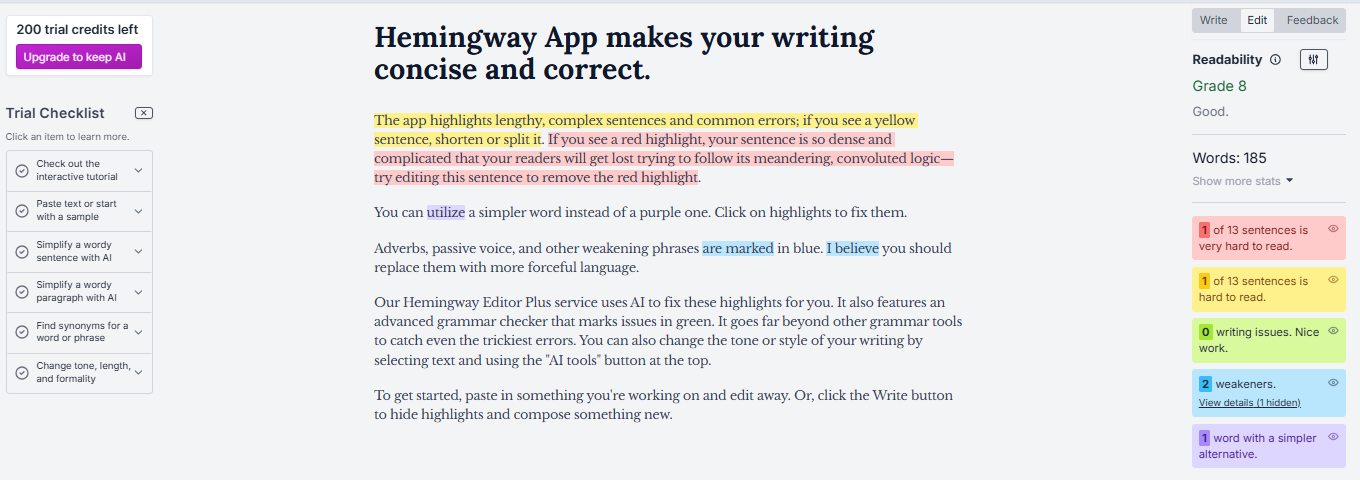
Hemingway Editor focuses on one thing: making your writing short and clear. The free web editor highlights long sentences in yellow and red, marks passive voice and adverbs, and gives your text a reading grade level. The paid Editor Plus adds AI that rewrites those sentences for you.
Key features
Pricing
| Plan | Price | What you get |
|---|---|---|
| Free web editor | $0 | Highlights and readability score, no AI rewrites |
| Desktop app | $19.99 one time | The classic editor for Mac and Windows, works offline |
| Individual 5K | $8.33 a month billed yearly ($100), or $10 month to month | 5,000 AI sentence rewrites a month, unlimited grammar fixes, document feedback |
| Individual 10K | $12.50 a month billed yearly ($150), or $15 month to month | 10,000 AI sentence rewrites a month |
| Team 10K | $12.50 per user a month billed yearly | Up to 50 users on one bill with admin controls |
Editor Plus comes with a 2 week free trial and no credit card is needed.
Best for: bloggers, marketers and anyone who tends to write long sentences. It is not a full grammar checker on the free plan, so pair it with another tool if you need spelling and grammar fixes for free.
Wordtune is built by AI21 Labs and is best known for its rewrite feature. You highlight a sentence and it gives you several ways to say the same thing, such as more casual, more formal, shorter or longer. Spelling and grammar checks are unlimited even on the free plan.
Key features
Pricing
| Plan | Price | What you get |
|---|---|---|
| Basic | $0 | Unlimited spelling and grammar checks, 10 rewrites a day, 3 summaries a month |
| Advanced | $6.99 a month billed yearly, or $13.99 month to month | 30 rewrites a day, 15 summaries a month, unlimited AI recommendations |
| Unlimited | $9.99 a month billed yearly, or $19.99 month to month | Unlimited rewrites and summaries, vocabulary and fluency upgrades, premium support |
Paid plans come with a 3 day free trial. Students, teachers and nonprofits get 30 percent off.
Best for: non native English speakers and anyone who knows what they want to say but struggles to phrase it well. The free plan is one of the few that gives unlimited grammar checks.
Ginger is one of the older grammar checkers and is popular with non native English speakers. It corrects whole sentences at once instead of one word at a time, and it can read your text out loud so you can hear how it sounds.
Key features
Pricing
| Plan | Price | What you get |
|---|---|---|
| Free | $0 | Basic grammar and spelling checks with a daily limit |
| Premium | About $7.49 a month billed yearly, or $13.99 month to month | Unlimited AI grammar corrections, rephrasing, translation, text reader |
Prices are from the Capterra listing updated in 2026 and may vary by region or sale.
Best for: English learners who want a tool that explains mistakes and reads text aloud. It does not work in Google Docs and has no plagiarism checker, so it suits personal writing more than academic work.
Pick the tool based on what you write most, not on which one has the longest feature list.
| If you need | Pick this | Why |
|---|---|---|
| One tool for email, docs and chat | Grammarly | Works in the most apps and the free plan covers daily writing |
| Grammar plus rewriting on a budget | QuillBot | Paraphraser and grammar checker in one at $8.33 a month |
| Deep feedback on a book or long blog | ProWritingAid | 25 or more style reports and a lifetime plan |
| Writing in German, French, Spanish or other languages | LanguageTool | Checks grammar in more than 30 languages |
| Shorter, clearer sentences | Hemingway Editor | Highlights long sentences and passive voice at a glance |
| Help saying things the right way in English | Wordtune | Several rewrite options for every sentence, free grammar is unlimited |
| Learning English with explanations | Ginger | Explains repeat mistakes and reads your text aloud |
Three quick tips before you pay:
After using all seven of these tools on my own emails, blog posts and longer drafts, here is where I landed. Grammarly is the one I keep coming back to. It catches the most mistakes with the fewest false alarms, and it is already there in every app I open, so I never have to copy and paste my text anywhere. If I could only keep one tool, it would be this one.
QuillBot surprised me the most. I expected a paraphrasing gimmick and got a solid grammar checker with a rewrite tool I now use almost daily, at a lower price than Grammarly. Wordtune was close behind for the same reason, and its free plan with unlimited grammar checks is the best deal on this list.
ProWritingAid is the tool I open when I am editing something long. The reports showed me habits I did not know I had, such as starting too many sentences the same way. It is slower to use, so I would not run it on a quick email. Hemingway sits in the same category for me. It does one job, cutting long sentences, and it does that job better than anything else here.
LanguageTool and Ginger were the two I used the least, but for a clear reason. I write mostly in English, so I did not need 30 languages or a text reader. If you write in German or Spanish, or you are still learning English, both of them do things the other five cannot.
My advice is simple. Pick two free plans, paste in the same piece of writing and see which suggestions you actually accept. That is the tool worth paying for. For me that was Grammarly for everyday writing and ProWritingAid for anything over a thousand words.
All prices and features in this article were checked on October 15, 2026 against each tool's official pricing page. Prices may differ by region, student status or ongoing sales.

Understanding the Role of a Data ScientistBefore embarking on your data science journey, it's essential to understand th...
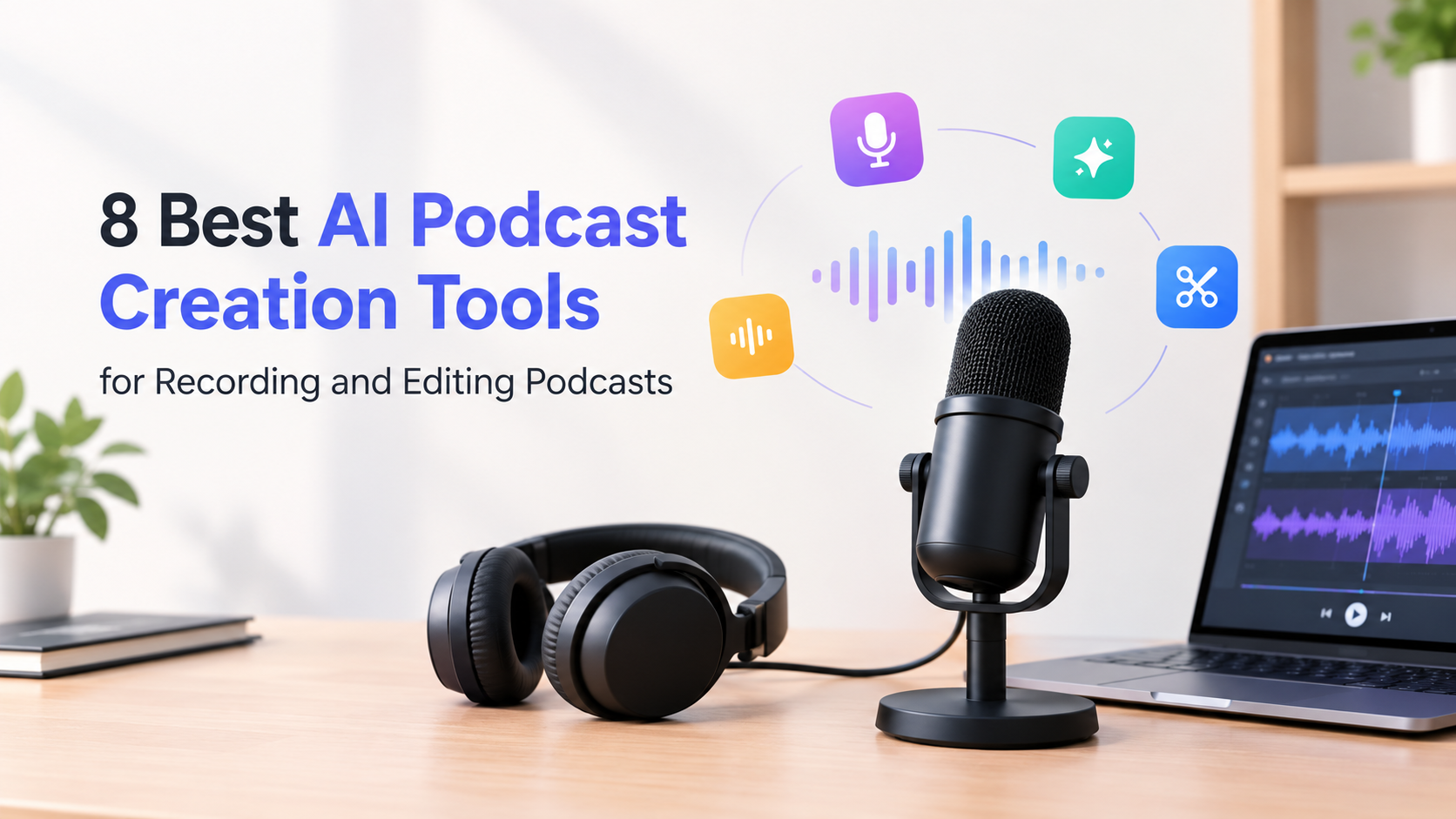
Nobody subscribes to a podcast because the audio was mastered well.They subscribe because you said something worth heari...

I edit a lot of photos. Some of it is work (product shots for a small online store I help run, images for blog posts and...

The fastest way to turn a lyric or an idea into a finished, original song in 2026 is an AI music generator, and after we...