
InSnoop Review 2026: An Honest Look at the Anonymous Instagram Story Viewer
People come to InSnoop to do one thing that is to watch a public Instagram Story without opening it from their own accou...
Three charts. Zero sign-ups. One nagging question answered.
Every "free AI tool" lives in one of two worlds. In the first, free means free: you paste, you click, you leave with a file. In the second, free means a demo that stops just short of the download button and asks for your email, your card, or both. Before you drop real sales numbers into chartgpt.co, you want to know which world it lives in.
So we didn't read the marketing. We tested it. A bar chart, a line chart and a pie chart, each taken from an empty box to a downloaded file, with one eye on the chart and the other on what the site asked us for along the way.
4.2 out of 5
The verdict in a sentence: ChartGPT is a legitimate, working tool that drew every chart correctly, asked for nothing, and let us export without a catch. It loses marks only for forgetting your work the moment you close the tab, and for locking its API behind the top plan.
Best for: a clean chart in your deck in under a minute
Skip if: you need charts saved, reopened or automated
| The legit test | What we found | Verdict |
| Does it actually draw the chart? | Three for three, correctly scaled and labelled, in seconds | Pass |
| Does it want a sign-in or a card first? | Never asked, not once, across three charts | Pass |
| Are the exports real or bait? | PNG, SVG, PDF and JSON all live on the free plan, no locks | Pass |
| What happens to your data? | Stays in the browser tab, nothing is sent to a server | Pass |
| Are the prices and limits upfront? | Three plans, clear caps, no surprises | Pass |
| Does it keep your charts? | No, a refresh wipes everything | Known limit |
| Can you automate it? | Only on the Team plan; Pro gets a waiting list | Known limit |
Five passes and two limits that are disclosed rather than hidden. That is what "legit" looks like for a tool this size. The rest of this review is the evidence.
The loop is simple: describe the chart or paste the numbers, generate, export. A few details make it feel polished rather than fiddly.
We dropped plain markdown tables straight into the box and ChartGPT parsed them on the spot: no column mapping, no cleanup, just a little tag in the corner reading the chart type and point count. If you spend your days copying numbers out of spreadsheets and chat windows, that single skip is the whole sell.
Every type carries a one-line note on when to use it, which tells you exactly who this is built for: people who know they need a chart but not which one. Bar for a handful of categories side by side. Grouped for two or more series within each category. Stacked for parts of a whole. Line for a value over time, Area for the same with the space underneath filled in. Horizontal for long labels that won't fit under a bar. Pie for shares of one total, Donut for the same with the total parked in the middle, Scatter for the relationship between two measures. Then a one-click switcher redraws your data as any of the other eight without re-entering a thing.
Zero baselines. Values printed on the bars. An axis that scales itself. A title lifted from your data. The charts come back looking deck-ready, which is rarer than it should be.
Beneath every chart sits a row of buttons: Copy JSON, SVG, PNG, PDF. This is where most "free" chart tools quietly become paid ones. Here, all four worked with no account. Next to them, a line of small print says nothing you paste is stored on a server and the chart lives only in your browser tab until you export it. For real business figures, that is the most reassuring sentence a free web tool can print.
If you want ChartGPT drawing charts inside your own tools, the API is the way in, with a ceiling of 10,000 calls a month on the Team plan. Pro users get a waiting list, nothing more. For a team feeding a dashboard or a reporting pipeline, 10,000 calls is comfortable. For anyone hoping to script charts on a budget, it's a wall.
A legitimacy question deserves receipts, so here is the full run, step by step, with a note at each stage on what the site asked for. (Spoiler: nothing.)
Step 1 — The menu
The Chart Makers menu lists eight named makers with a one-line explanation under each; the output screen adds a horizontal variant, which is where nine comes from.
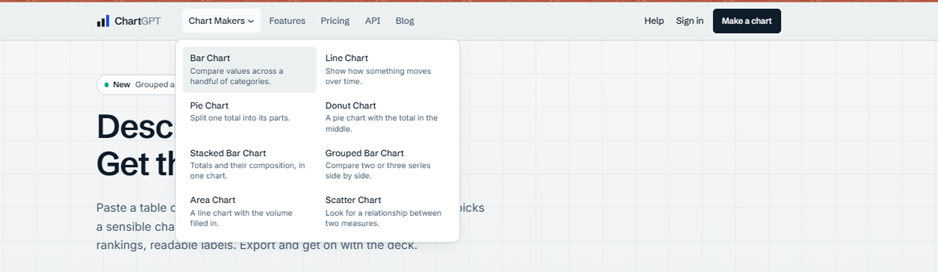
Scatter is framed as a way to look for a relationship between two measures, Donut as a pie with the total in the middle. The audience is clearly non-analysts who want a good-looking result fast, and every everyday type is there.
Step 2 — A bar chart from a pasted table
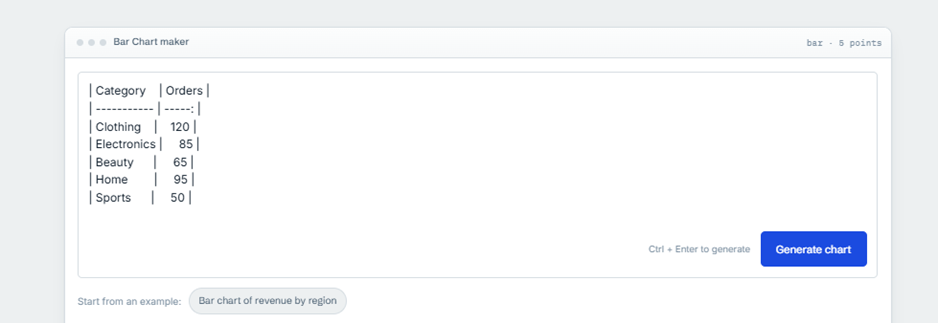
We pasted orders by product category (Clothing 120, Electronics 85, Beauty 65, Home 95, Sports 50) as a markdown table. ChartGPT read it instantly and tagged the job bar, 5 points.
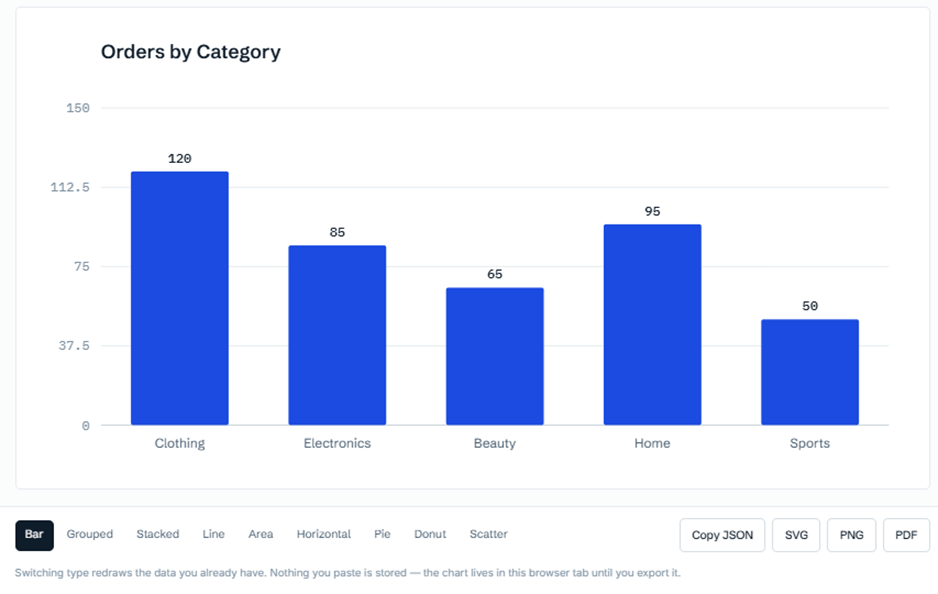
Back came Orders by Category: zero baseline, a value on every bar, an axis it scaled to 150 by itself. Beneath it, the strip that mattered: nine chart types on the left, four export buttons on the right. Every one live. No lock icons, no upgrade nudge, no "sign in to download."
Step 3 — A line chart for a trend
Next, monthly visitors from January to June, rising from 1,200 to 2,300. Tagged line, 6 points, drawn without complaint.
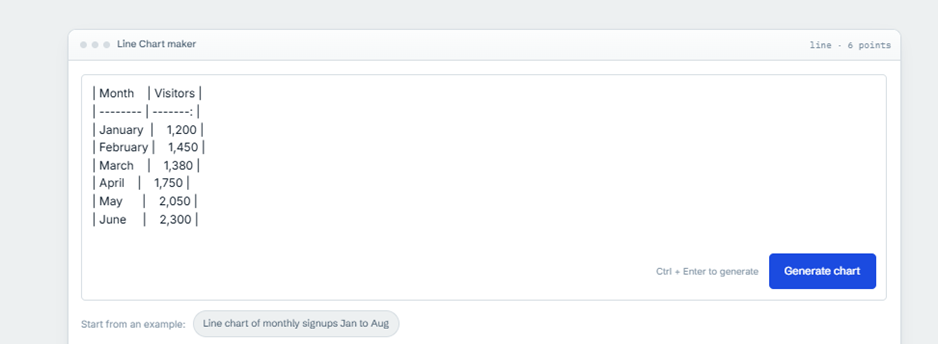
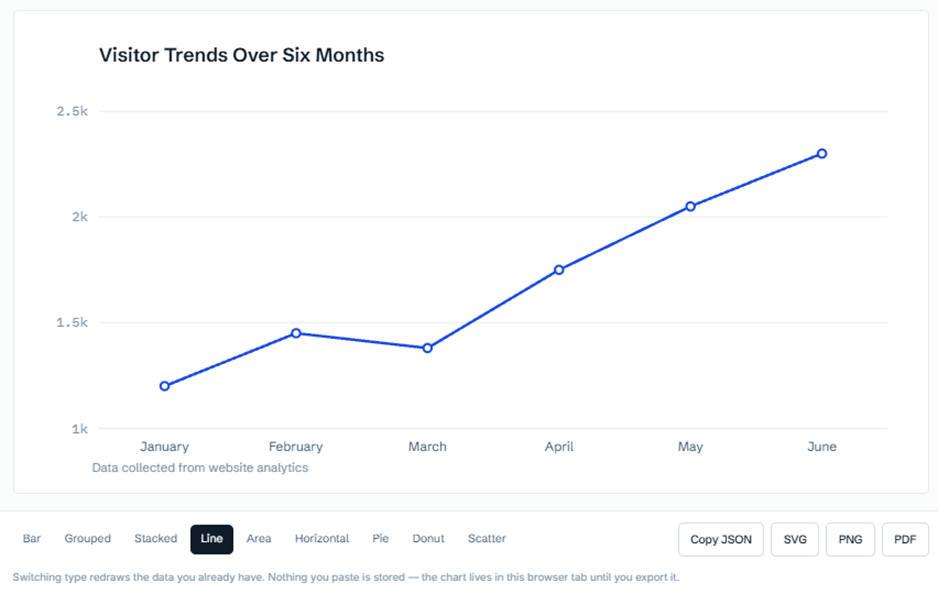
It made two tidy choices unprompted: it shortened the axis to thousands instead of printing long numbers, and it added a marker on each month plus a subtitle reading Data collected from website analytics. Switching from the bar test to this one triggered no save prompt and no paywall, because changing type just redraws what is already in the tab.
Step 4 — A pie that turned into a donut
For the last run we used traffic-source percentages (Google Search 40, Social Media 25, Direct 20, Referral 10, Email 5) and opened the Pie chart maker.
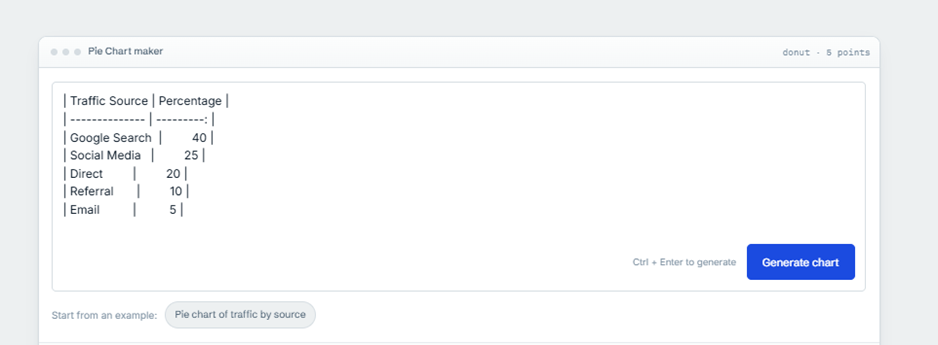
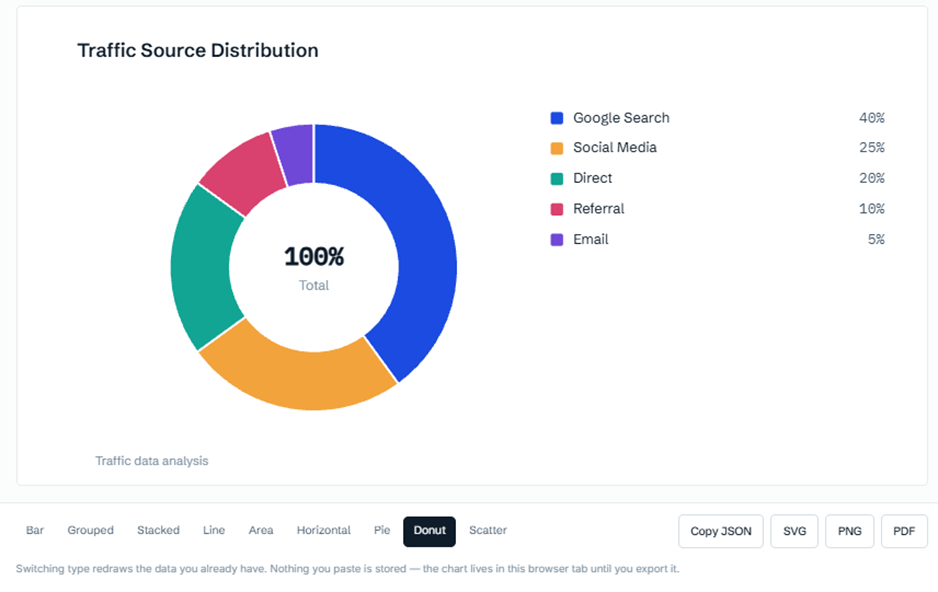
We asked for a pie and got a donut: a ring titled Traffic Source Distribution, 100% Total in the centre, each share in a legend. It's a defensible call, since a donut reads proportions cleanly and the hole gives the total somewhere to sit, and one click on the switcher turns it back into a plain pie. Exports open, no account requested, same as the first two.
Final tally: three charts, three correct results, zero sign-ups, zero cards, zero locked buttons.
What we'd happily tell a friend
What we'd warn them about
Plain pricing is part of being legit, and ChartGPT keeps it to three plans with no fine-print surprises.
| Free | Pro (most popular) | Team |
| A chart now and again | Decks most weeks | One visual language across the whole team |
| $0, no card needed | $14.99 / month, billed monthly | $49.99 / month for 5 seats, then $9 a seat |
| 15 charts a month | 100 charts a month | Unlimited charts, within fair use |
| All nine chart types | Everything in Free | Everything in Pro |
| PNG, SVG and PDF export | Email support within one working day | API access, 10,000 calls a month |
| Paste up to 500 rows | GST invoices | Single sign-on with Google Workspace |
| A place on the API waiting list | Invoice billing and GST invoices | |
| Start charting | Start 14-day trial | Talk to us |
Free if you need a chart for a one-off deck, a class, or a quick readout: 15 a month, all nine types, full export, and it never asked us to sign in. It runs on the same engine as the paid plans with only the monthly count held back, which is why it feels like a proper tool rather than a locked demo.
Pro if you build slides most weeks and want 100 charts plus someone to email. The support turned out to be a quiet highlight: paid plans get replies inside one working day, and the answers we received were quick and useful rather than canned. A site that answers its email is a site with people behind it.
Team if you want everyone's charts to match, single sign-on, and the API.
Datawrapper for polished, publication-ready charts, with a free plan that exports PNG. Flourish for interactive and animated charts, though free work is published publicly. RAWGraphs, free and open-source, needs no account and processes data only in the browser, making it the closest match to ChartGPT's no-login feel, with more chart types in return for a more manual setup. Google Sheets or Excel if the data already lives there and you don't mind building the chart yourself. Canva when the chart is one piece of a bigger design. A general AI assistant such as ChatGPT or Claude can draw a chart from a description without a dedicated chart screen.
Rule of thumb: Datawrapper or Flourish for publication, RAWGraphs for no login and more control, Sheets or Excel when the data is already there, Canva for design work. For pure speed, ChartGPT's paste-and-export loop is still the quickest of the bunch.
Yes. It does what its home page says, asks for nothing to prove it, keeps your numbers in your own browser, and tells you the price and the limits before you hit them. Every reservation we have is about scope, not trust.
Need a clean chart occasionally? Use the Free plan and don't think twice. Build decks weekly? Pro is the sensible step up. Running a team that wants matching charts and an API? That is who Team was written for. The only people who should look elsewhere are those who mainly need to save, reopen, embed or automate charts on a budget, because that is exactly where ChartGPT's free loop ends.
For everyone else: a fast, honest little tool that does one job well, and is upfront about the jobs it doesn't do.

People come to InSnoop to do one thing that is to watch a public Instagram Story without opening it from their own accou...
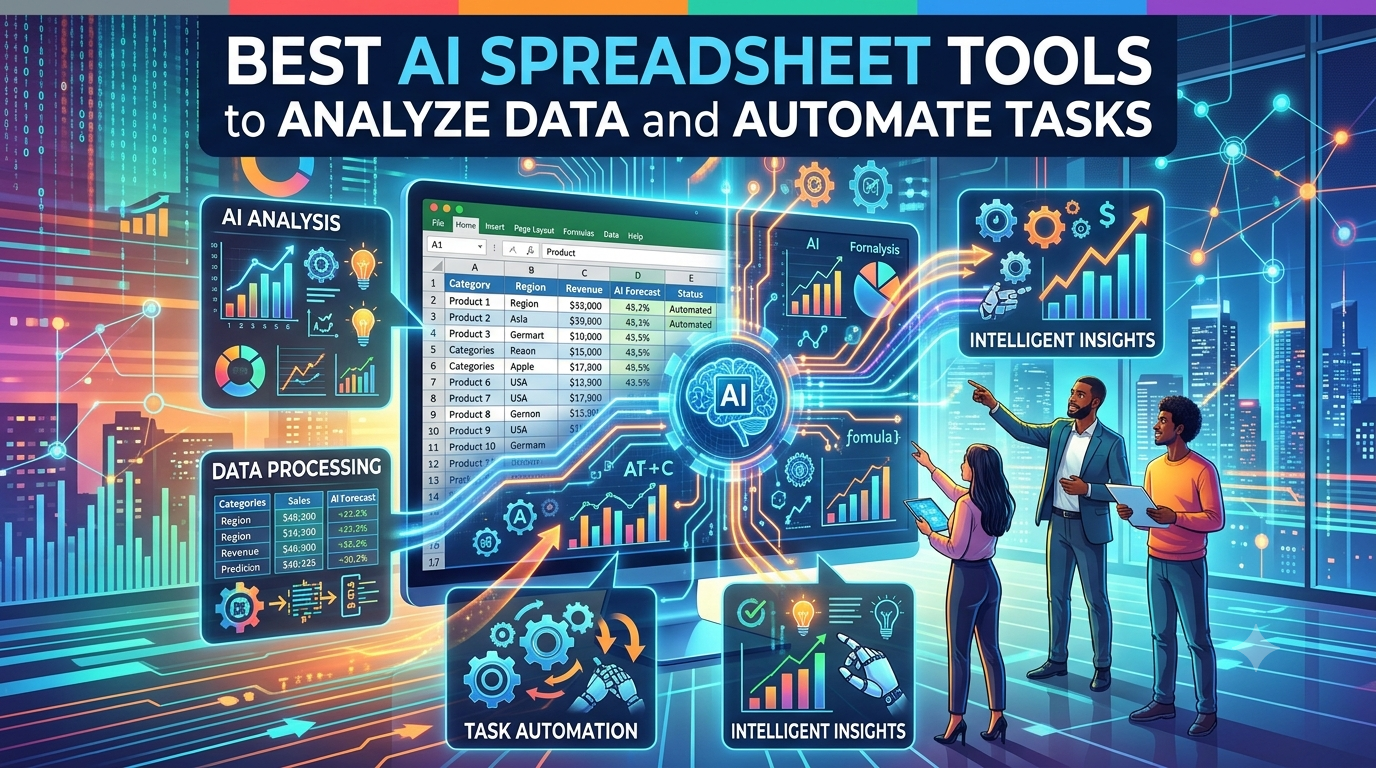
Best AI Spreadsheet Tools at a GlanceToolBest ForWorks InStandout AI FeatureStarting PriceMicrosoft Excel with CopilotPe...
Lenso.ai is a reverse image search tool. You upload a photo, and it shows you where that photo appears online. It can al...

Phyzii is a cloud-based CRM built by Cirrius Technologies specifically for pharmaceutical and life sciences sales teams....